NEW!
Microsoft Office Home and Business 2024
Buy Office Home and Business 2024 at a great price – direct download included
Product Description
For handling all tasks related to the digital office, Office Home and Business 2024 is an excellent choice. It is no coincidence that this software is the absolute market leader in its segment. With an increasing number of features and an intuitive user interface, it is designed for both professional and private users.
Since the release of its first version in 1998, Microsoft has continuously updated and improved Office. This also applies to the latest 2024 edition, which will be released alongside the new operating system Windows 11.
Core Features for More Efficient Office Work with Microsoft Office 2024
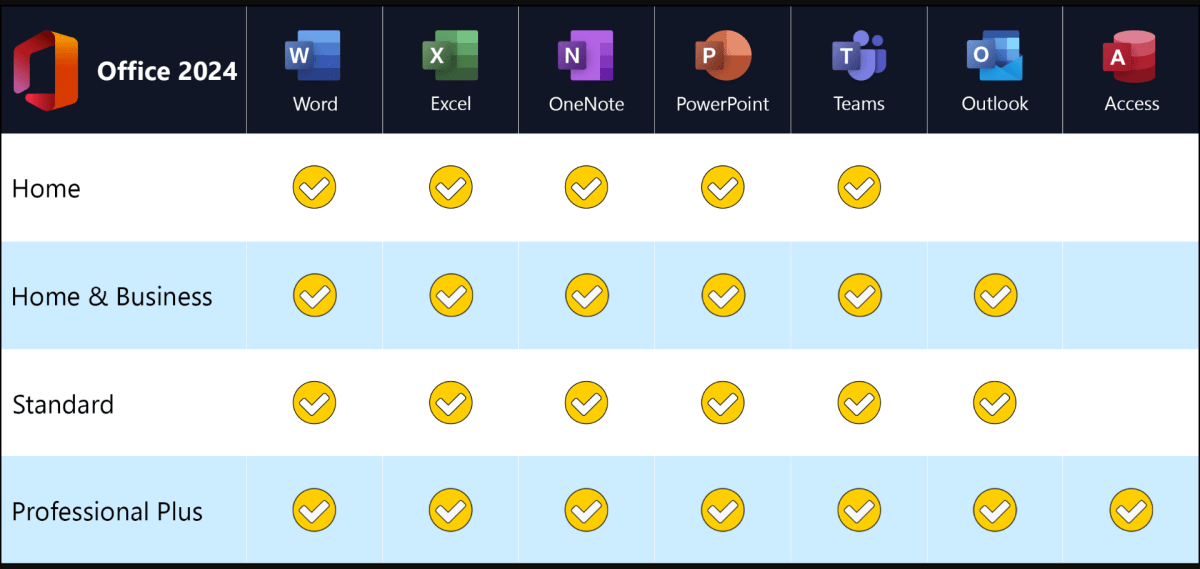
Compared to the Professional edition of Microsoft Office, the software offering of Microsoft Office Home and Business 2024 is more streamlined. Microsoft focuses on the classic needs of users and provides the most commonly used Office applications in one complete package.
The target group includes not only private users in a home environment but also commercial users, such as small businesses. This clearly distinguishes Home and Business from the Home & Student edition, which is more affordable and intended exclusively for non-commercial use.
Microsoft Office Home and Business 2024 includes the essential applications required for efficient digital office work at home or in a business environment:
-
Word
-
Excel
-
PowerPoint
-
Outlook
Outlook 2024 and Microsoft Teams Included
Outlook 2024 is also included, allowing you to manage your emails and calendar directly from your PC. Multiple email accounts can be set up depending on your needs, significantly improving daily productivity.
In the 2024 version, Microsoft Teams replaces the previously used Skype. Teams offers free usage, supports large groups, and delivers strong performance for video conferencing and everyday communication.
Improved Performance and Better Overview with Dark Mode
While Microsoft has kept the changes in Microsoft Office Home and Business 2024 relatively subtle, several practical improvements are included—especially in terms of performance and stability. Even on older computers with limited hardware resources, Office applications now run more smoothly and respond faster.
Creating complex documents, large PowerPoint presentations, or extensive Excel spreadsheets is noticeably quicker thanks to these performance enhancements.
For better visual clarity, the latest version also includes a Dark Mode, which can be activated via the “Layout” tab. The interface switches to a darker design, helping users maintain better focus—especially when working with multiple windows or programs on a single monitor. Dark Mode is optional and can be enabled or disabled at any time.
Our Innovation for Your Future!
If the Office package you want is temporarily unavailable, we will automatically provide you with an upgrade to a higher version with extended functionality at no additional cost. With our offer, you receive:
This allows you to benefit from a more comprehensive Office package without any delay.
Important Notes on Office Versions
Compatibility between the installation file and the product key is essential. Due to the wide variety of software versions, it is mandatory that the reinstallation is performed using the download installation file provided by us.
Additional Information:
-
You will receive a product key, which will be sent by email immediately after purchase
-
The license is perpetual
-
No subscription fees required
© 2025 Softwarewelt24 | All rights reserved


 Overview
 Languages










Reviews
Clear filtersThere are no reviews yet.